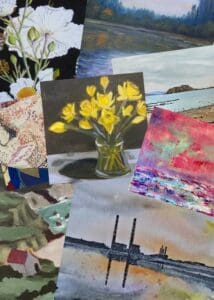
How to Photograph Your Artwork Like a Professional (Without Expensive Gear)
Selling art online means your photography is your first impression.
Collectors don’t experience your brushstrokes in person — they experience pixels. And whether you’re listing on Irish Artmart, applying to exhibitions, or promoting your work on Instagram, the quality of your artwork photography directly affects perceived value, trust, and sales.
The good news?
You do not need expensive studio lighting, a €2,000 camera, or a professional setup.
With natural light, a smartphone, and proper technique, you can create professional-level artwork photographs that elevate your entire portfolio.
This guide will walk you through everything step-by-step.
Why Artwork Photography Matters More Than You Think
Before we get into technique, let’s talk value.
Professional-looking photography:
-
Increases buyer trust
-
Raises perceived artwork value
-
Reduces refund risk
-
Improves social media engagement
-
Boosts SEO visibility in Google Images
-
Increases click-through rates on Irish Artmart
A poorly lit image can make a €500 painting look like €50.
Photography is not an afterthought. It’s part of your professional presentation as an artist.
Step 1: Use Natural Light (Your Best Free Tool)
Natural light produces the most accurate colours — especially important for oil, acrylic, and watercolour work.
Best Setup:
-
Place artwork near a large window
-
Shoot during mid-morning or early afternoon
-
Use indirect daylight
-
Turn off all indoor lights
Avoid:
-
Yellow ceiling lights
-
Flash
-
Direct harsh sunlight
-
Mixed lighting (window + artificial)
If the sunlight is strong, soften it with a sheer curtain.
Soft, even light is the goal.
Step 2: You Can Use Your Smartphone
Modern smartphones are extremely capable.
What matters most is:
-
Lighting
-
Stability
-
Alignment
Quick Smartphone Tips:
-
Use the rear camera
-
Clean the lens first
-
Turn on grid lines
-
Tap to focus on the centre of artwork
-
Lower exposure slightly if highlights are blown
If you want a small upgrade:
-
Basic tripod (€20–€40)
-
Bluetooth shutter remote
That’s it.
No expensive gear required.
Step 3: Keep the Camera Perfectly Parallel
This is where many artists go wrong.
If the camera is tilted up or down, the artwork becomes distorted (trapezoid-shaped).
Checklist:
-
Camera centred at the middle of artwork
-
Lens level (not angled)
-
Equal spacing around edges
-
Use grid lines to align vertically
Professional photography is often about precision, not equipment.
Step 4: Eliminate Glare (Especially With Glass)
Framed work creates reflection challenges.
To reduce glare:
-
Remove glass if possible
-
Tilt artwork slightly forward
-
Adjust light angle
-
Wear dark clothing
Check carefully before finalising your shot.
Glare can instantly reduce professionalism.
Step 5: Choose a Neutral Background
Your artwork must be the hero.
Best backgrounds:
-
Plain white wall
-
Soft grey wall
-
Clean wooden floor
Avoid:
-
Cluttered rooms
-
Distracting furniture
-
Strong coloured walls
Lifestyle shots are excellent — but they should enhance, not distract.
Step 6: Capture Multiple Image Types
Buyers need reassurance.
Include:
-
Full straight-on shot
-
Close-up texture
-
Side profile depth
-
Signature detail
-
In-room mockup
Online buyers cannot touch your artwork — your images must do the convincing.
Step 7: Edit Carefully (Accuracy Over Drama)
Free apps:
Adjust:
-
Brightness
-
Contrast
-
White balance
-
Straighten
-
Crop
Do NOT:
-
Oversaturate
-
Use heavy filters
-
Alter colours dramatically
Your buyer should think:
“This is exactly what I saw online.”
Step 8: Export Settings for Online Selling
For Irish Artmart and other marketplaces:
-
Minimum 1500px on longest side
-
High-quality JPEG
-
Clean filename
Example:
irish-landscape-oil-painting-original.jpg
This improves SEO and Google image discoverability.
Step 9: When Should You Hire a Professional?
Consider it if:
-
Artwork value exceeds €1,000
-
Submitting to galleries
-
Creating print catalogues
-
Applying for grants
Otherwise, natural light + technique is more than enough.
Common Artwork Photography Mistakes
Avoid these:
-
Shooting under yellow bulbs
-
Cropping edges
-
Angled perspective
-
Cluttered background
-
Low-resolution uploads
-
Visible glare
Small details make a big difference.
How Better Photography Increases Sales
Better images:
-
Increase time spent on listing
-
Increase enquiries
-
Reduce buyer hesitation
-
Improve perceived professionalism
-
Encourage social shares
On Irish Artmart, strong visuals directly increase engagement.
Collectors scroll quickly.
Your image must stop them.
Final Professional Checklist
Before uploading:
☐ Is the artwork straight?
☐ Is lighting even?
☐ Are colours accurate?
☐ Is there glare?
☐ Is the background clean?
☐ Have you included close-ups?
☐ Is resolution high?
If yes — upload with confidence.
Explore Irish Artmart
Support Irish artists, discover original work, and build a creative practice that lasts:
👉 https://irishartmart.ie
Disclaimer: The views and opinions expressed in this article do not necessarily reflect the official policy or position of Irish Artmart.
Irish Artmart – Your Gateway to Artistic Excellence.
Explore Original Irish Art
Discover original Irish paintings, prints, and commissions from talented artists across Ireland.
Browse Art